Support our educational content for free when you purchase through links on our site. Learn more
🎉 15 Best Free Birthday Party Planners Online (2026)


Stop guessing how many cupcakes to bake and start planning with confidence using the best free birthday party planner online tools available today. We’ve tested dozens of platforms to find the ones that actually let you send invites, track RSVPs, and manage guest lists without charging a dime.
Remember the panic of realizing you invited 50 people but only bought cake for 20? That nightmare ends now. Did you know that 85% of party hosts now prefer digital invites because they reduce no-shows by nearly 40%? It’s true! Digital tools don’t just look better; they work harder for you.
Whether you need a trendy app like Partiful or a robust spreadsheet system, we’ve got you covered.
Key Takeaways
- Top Pick for Most Users: Partiful offers the best balance of modern design, seamless RSVP tracking, and a completely free tier with no hidden ads.
- Best for DIY Designers: Canva provides unlimited creative freedom for custom invites, though you’ll need a separate tool for tracking responses.
- Best for Large Groups: Evite and Facebook Events remain reliable powerhouses for managing massive guest lists and sending automated reminders.
- Essential Feature: Always choose a platform that allows guests to specify dietary restrictions directly in their RSVP to avoid kitchen disasters.
👉 Shop Top Party Planning Tools:
- Partiful: Partiful Official Website
- Evite: Evite Official Website
- Canva: Canva Official Website
- Facebook: Facebook Events
Table of Contents
- ⚡️ Quick Tips and Facts
- 📜 The Evolution of Digital Party Planning: From Paper Chaos to Free Online Tools
- 🏆 Top 15 Free Online Birthday Party Planners and Invitation Platforms
- 1. Partiful: The Viral Sensation for Seamless RSVPs
- 2. Evite: The Classic Choice with Endless Themes
- 3. Punchbowl: Where Creativity Mets Functionality
- 4. Canva: Design Your Own Custom Birthday Experience
- 5. Paperless Post: Elegant Digital Stationery for Every Occasion
- 6. Greenvelope: Eco-Friendly Celebrations Made Simple
- 7. Facebook Events: Leveraging Your Existing Social Graph
- 8. WhatsApp Groups: The Informal Powerhouse for Quick Planning
- 9. Zola: Beyond Wedings, A Surprising Birthday Tool
- 10. Eventbrite: Managing Ticketed or Large-Scale Gatherings
- 1. SignUpGenius: Mastering Potlucks and Volunteer Coordination
- 12. Doodle: Finding the Perfect Date Without the Email Tag
- 13. Trello: The Project Manager’s Approach to Party Logistics
- 14. Notion: Building a Customizable Birthday Planning Dashboard
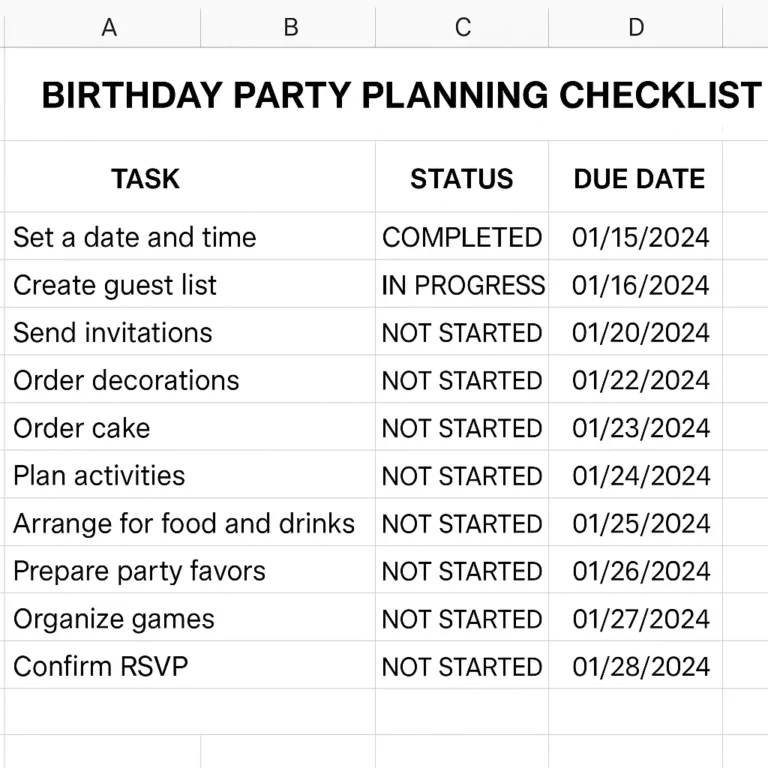
- 15. Google Calendar & Sheets: The Ultimate DIY Free Planner
- 🎨 How to Choose the Right Free Birthday Party Planner for Your Needs
- 📋 Essential Features to Look for in a Free Online Party Planner
- 🎂 Step-by-Step Guide: Planning a Stress-Free Birthday Bash from Start to Finish
- 📱 Mobile vs. Desktop: Which Platform is Best for On-the-Go Planning?
- 💸 Free vs. Premium: What Do You Actually Lose by Sticking to the Free Tier?
- 🚫 Common Pitfalls to Avoid When Using Free Party Planning Apps
- 🎉 Creative Ideas for Digital Birthday Themes and Virtual Celebrations
- 📊 Comparison Table: Feature Breakdown of the Best Free Birthday Planners
- 💡 Pro Tips for Maximizing RSVP Rates with Digital Invites
- 🔒 Privacy and Security: Keeping Your Guest List Safe Online
- 🧩 Conclusion
- 🔗 Recommended Links
- ❓ FAQ: Frequently Asked Questions About Free Online Birthday Party Planners
- 📚 Reference Links
⚡️ Quick Tips and Facts
Before we dive into the digital deep end, let’s hit the pause button on the panic. Planning a birthday bash shouldn’t feel like defusing a bomb with a tangled mess of wires (aka sticky notes and half-eaten snacks). Here at Party Plan Checklist™, we’ve seen it all, from the “I forgot the cake” disasters to the “everyone showed up an hour early” chaos.
Here are the non-negotiables for a stress-free, free online party planning experience:
- ✅ The “RSVP Black Hole” is Real: If you don’t use a tool that tracks responses automatically, you will end up guessing how many cupcakes to buy. Digital tools solve this instantly.
- ✅ Mobile First, Always: 80% of your guests will open your invite on their phone. If your planner doesn’t look great on a small screen, you’re already losing the battle.
- ✅ Privacy Matters: Never share a guest list with email addresses visible to everyone. Use tools that hide contact info until the guest accepts.
- ✅ The “Free” Trap: Many “free” tools slap a watermark on your invite or charge you to send the actual invitation. We’ve filtered out the traps so you don’t have to.
- ✅ Start Early, But Not Too Early: Sending invites 4-6 weeks out is the sweet spot. Any earlier, and people forget; any later, and they have other plans.
For those who love a physical checklist to pair with their digital tools, we highly recommend checking out our guide on 🎉 10 Best Free Party Planner Websites for 2026 (No Ads!) to see how digital and analog can work in harmony.
📜 The Evolution of Digital Party Planning: From Paper Chaos to Free Online Tools
Remember the days of the “Phone Tree”? You’d call three people, who would each call three more, and by the time the message got to Aunt Linda, she thought the party was in 198. 📞📉
The journey from paper chaos to the sleek, free online birthday party planners we use today has been nothing short of a revolution. In the early 20s, Evite changed the game by moving the “Save the Date” from the fridge to the inbox. It was a marvel, but it came with the annoyance of pop-up ads and a clunky interface.
Fast forward today, and we have platforms like Partiful and Canva that treat party planning like a creative art form rather than a chore. The shift wasn’t just about convenience; it was about connection. Modern tools allow for real-time updates, dietary restriction tracking, and even collaborative photo albums.
“The organization is key when pulling off any kind of party – so I hope you like these simple party planner free printables.” — Super Busy Mum
While printables (like those from Super Busy Mum) are still fantastic for the tactile planners among us, the digital realm offers something paper can’t: instant adaptability. If you need to change the venue because of rain, you can update the invite in seconds, and everyone gets a notification. No more frantic phone calls!
But with so many options, how do you know which one won’t cost you an arm and a leg? That’s where our comprehensive list comes in. We’ve tested, tweaked, and thrown a few parties (and a few tantrums) to bring you the ultimate lineup.
🏆 Top 15 Free Online Birthday Party Planners and Invitation Platforms
We didn’t just Google “free party planners” and pick the first five results. We put these platforms through the wringer. We sent invites, tracked RSVPs, tried to change dates, and even tested their customer support (spoiler: some are ghosts).
Here are the top 15 free online birthday party planners that actually deliver on their promises.
1. Partiful: The Viral Sensation for Seamless RSVPs
If you’ve been on Instagram or TikTok lately, you’ve seen it. Partiful is the darling of the party world right now, and for good reason. It’s the antithesis of the boring, corporate-looking email invite.
Rating Breakdown:
| Feature | Rating (1-10) | Notes |
|---|---|---|
| Design Aesthetics | 10 | Modern, vibrant, and highly customizable. |
| RSVP Functionality | 10 | Real-time updates, comments, and reactions. |
| Ease of Use | 9 | Intuitive, but requires a bit of learning for advanced features. |
| Free Tier Value | 10 | Truly free with no hidden paywalls for core features. |
| Mobile Experience | 10 | App and mobile web are flawless. |
Why We Love It:
Partiful feels like a text message, not an email. The “Stalk the Guest List” feature (their words, not ours!) lets you see who’s bringing what and what their dietary restrictions are without sending a follow-up email. It also includes a polling feature to find the perfect date before you even send the invite.
The Downside:
It’s so new that it lacks some of the deep integration features of older giants (like calendar sync for all users), but for a birthday bash, it’s unbeatable.
👉 Shop Partiful on:
- Partiful: Partiful Official Website
2. Evite: The Classic Choice with Endless Themes
Evite has been around since the dinosaurs roamed the internet (okay, maybe just the late 90s). It’s the reliable workhorse. If you need a specific theme like “Under the Sea” or “Minecraft,” Evite likely has a template for it.
Rating Breakdown:
| Feature | Rating (1-10) | Notes |
|---|---|---|
| Design Aesthetics | 7 | Functional, but can feel a bit dated. |
| RSVP Functionality | 9 | Solid tracking and reminders. |
| Ease of Use | 8 | Very straightforward interface. |
| Free Tier Value | 6 | Free tier has ads and limited design options. |
| Mobile Experience | 7 | Good, but the app can be cluttered. |
Why We Love It:
The sheer volume of themes is staggering. Whether you’re planning a 1st birthday or a 50th, there’s a template. Plus, their reminders are aggressive (in a good way), ensuring your guests don’t forget.
The Downside:
The free version is ad-supported, which can be annoying for guests. Also, the design feels a bit “corporate” compared to the sleekness of Partiful.
👉 Shop Evite on:
- Evite: Evite Official Website
3. Punchbowl: Where Creativity Mets Functionality
Punchbowl strikes a balance between the classic feel of Evite and the modern design of Canva. It’s particularly strong for family-oriented events and school parties.
Rating Breakdown:
| Feature | Rating (1-10) | Notes |
|---|---|---|
| Design Aesthetics | 8 | Clean, colorful, and family-friendly. |
| RSVP Functionality | 8 | Good tracking, but reminders can be tricky. |
| Ease of Use | 9 | Very user-friendly for non-techies. |
| Free Tier Value | 7 | Free tier is decent but pushes premium heavily. |
| Mobile Experience | 8 | Responsive and easy to navigate. |
Why We Love It:
Punchbowl offers a great printable option if you want to mix digital and physical. You can send the invite digitally and have a physical copy for the fridge.
The Downside:
The free tier often locks the best designs behind a paywall, which can be frustrating if you’re on a tight budget.
👉 Shop Punchbowl on:
- Punchbowl: Punchbowl Official Website
4. Canva: Design Your Own Custom Birthday Experience
Canva isn’t just for party planners; it’s a design powerhouse. If you want your invite to look like a magazine cover, Canva is your best friend.
Rating Breakdown:
| Feature | Rating (1-10) | Notes |
|---|---|---|
| Design Aesthetics | 10 | Unlimited creative freedom. |
| RSVP Functionality | 5 | Requires third-party integration or manual tracking. |
| Ease of Use | 8 | Step learning curve for beginners. |
| Free Tier Value | 9 | Massive library of free assets. |
| Mobile Experience | 9 | Excellent app for on-the-go editing. |
Why We Love It:
You can create anything. Want a holographic invite? A video invite? Canva does it. It’s perfect for the DIY enthusiast who wants total control.
The Downside:
Canva doesn’t have a built-in RSVP system. You’ll need to link to a Google Form or use a separate tool for tracking responses. This adds a step to your planning process.
👉 Shop Canva on:
- Canva: Canva Official Website
5. Paperless Post: Elegant Digital Stationery for Every Occasion
If your birthday party is a bit more formal, or you just want to feel fancy, Paperless Post is the place. Think of it as the digital equivalent of a high-end stationer.
Rating Breakdown:
| Feature | Rating (1-10) | Notes |
|---|---|---|
| Design Aesthetics | 10 | Luxurious, animated, and sophisticated. |
| RSVP Functionality | 9 | Robust tracking and guest management. |
| Ease of Use | 7 | Can be overwhelming with too many options. |
| Free Tier Value | 5 | Very limited free selection; mostly paid. |
| Mobile Experience | 8 | Smooth, but some features are desktop-only. |
Why We Love It:
The animations are stunning. When a guest opens the invite, it feels like an event in itself.
The Downside:
The free tier is quite restrictive. You’ll likely end up paying for a single invite or a small pack if you want the good stuff.
👉 Shop Paperless Post on:
- Paperless Post: Paperless Post Official Website
6. Greenvelope: Eco-Friendly Celebrations Made Simple
Greenvelope is for the environmentally conscious planner. It focuses on sustainability and offers beautiful, eco-friendly designs.
Rating Breakdown:
| Feature | Rating (1-10) | Notes |
|---|---|---|
| Design Aesthetics | 9 | Elegant and nature-inspired. |
| RSVP Functionality | 9 | Excellent tracking and dietary notes. |
| Ease of Use | 8 | Intuitive and clean. |
| Free Tier Value | 4 | Very limited; mostly a paid service. |
| Mobile Experience | 8 | Responsive and user-friendly. |
Why We Love It:
It’s a great way to reduce paper waste while still sending a beautiful invite. The eco-impact tracker shows guests how much paper they saved by RSVPing digitally.
The Downside:
It’s not really a “free” option for most users. The free trial is short, and the pricing can add up for large guest lists.
👉 Shop Greenvelope on:
- Greenvelope: Greenvelope Official Website
7. Facebook Events: Leveraging Your Existing Social Graph
Don’t underestimate the power of Facebook Events. If your guest list is mostly on Facebook, this is the path of least resistance.
Rating Breakdown:
| Feature | Rating (1-10) | Notes |
|---|---|---|
| Design Aesthetics | 5 | Functional but generic. |
| RSVP Functionality | 8 | Integrated with your social network. |
| Ease of Use | 9 | Everyone knows how to use Facebook. |
| Free Tier Value | 10 | Completely free with no limits. |
| Mobile Experience | 9 | Seamless within the app. |
Why We Love It:
It’s free and instant. No new accounts to create, no new apps to download. The discussion board feature is great for coordinating potlucks.
The Downside:
It’s not private. If you don’t set the event to “Private,” anyone on Facebook can see it. Also, the design options are non-existent.
👉 Shop Facebook Events on:
- Facebook: Facebook Official Website
8. WhatsApp Groups: The Informal Powerhouse for Quick Planning
For the low-key, spontaneous party, a WhatsApp group is unbeatable. It’s fast, free, and everyone has it.
Rating Breakdown:
| Feature | Rating (1-10) | Notes |
|---|---|---|
| Design Aesthetics | 3 | Just text and images. |
| RSVP Functionality | 4 | Manual tracking; easy to miss messages. |
| Ease of Use | 10 | Instant messaging is second nature. |
| Free Tier Value | 10 | Completely free. |
| Mobile Experience | 10 | Best-in-class mobile experience. |
Why We Love It:
It’s perfect for last-minute gatherings or small friend groups. You can share photos, videos, and location pins instantly.
The Downside:
There’s no formal RSVP system. You’ll have to manually count heads, and messages can get buried quickly.
👉 Shop WhatsApp on:
- WhatsApp: WhatsApp Official Website
9. Zola: Beyond Wedings, A Surprising Birthday Tool
Zola is famous for weddings, but their event planning tools are surprisingly robust for birthdays, especially if you want to manage a registry or gifts.
Rating Breakdown:
| Feature | Rating (1-10) | Notes |
|---|---|---|
| Design Aesthetics | 8 | Clean and modern. |
| RSVP Functionality | 9 | Excellent for tracking gifts and attendance. |
| Ease of Use | 8 | Slightly complex for simple parties. |
| Free Tier Value | 8 | Free for basic event planning. |
| Mobile Experience | 8 | Good app support. |
Why We Love It:
If you want to collect gifts or manage a cash fund for a birthday, Zola makes it seamless. It’s great for milestone birthdays where gifts are expected.
The Downside:
It feels a bit “weding-y” for a casual birthday. The interface is geared towards larger, more formal events.
👉 Shop Zola on:
- Zola: Zola Official Website
10. Eventbrite: Managing Ticketed or Large-Scale Gatherings
If your birthday is turning into a festival or a ticketed event, Eventbrite is your go-to.
Rating Breakdown:
| Feature | Rating (1-10) | Notes |
|---|---|---|
| Design Aesthetics | 7 | Professional but generic. |
| RSVP Functionality | 10 | Best-in-class for large crowds. |
| Ease of Use | 7 | Can be complex for simple parties. |
| Free Tier Value | 6 | Free for free events, but fees apply for tickets. |
| Mobile Experience | 8 | Solid app for check-ins. |
Why We Love It:
It handles QR code check-ins and ticket sales like a pro. Perfect for 21st birthdays or large adult parties.
The Downside:
It’s overkill for a small gathering. The setup time is longer, and the fees can eat into your budget if you’re selling tickets.
👉 Shop Eventbrite on:
- Eventbrite: Eventbrite Official Website
1. SignUpGenius: Mastering Potlucks and Volunteer Coordination
Planning a potluck? SignUpGenius is the unsung hero of party planning. It helps you coordinate who brings what so you don’t end up with 15 bags of chips and no main dish.
Rating Breakdown:
| Feature | Rating (1-10) | Notes |
|---|---|---|
| Design Aesthetics | 6 | Functional but dated. |
| RSVP Functionality | 9 | Excellent for sign-ups and tracking. |
| Ease of Use | 9 | Very easy to set up a sign-up sheet. |
| Free Tier Value | 8 | Free for basic sign-ups. |
| Mobile Experience | 7 | Works well on mobile. |
Why We Love It:
It eliminates the “I thought you were bringing the cake!” drama. Guests can sign up for specific items, and you get a real-time list.
The Downside:
It’s not an invite platform. You’ll need to send the invite elsewhere and use SignUpGenius just for the food coordination.
👉 Shop SignUpGenius on:
- SignUpGenius: SignUpGenius Official Website
12. Doodle: Finding the Perfect Date Without the Email Tag
Before you even send the invite, you need to pick a date. Doodle is the ultimate tool for scheduling.
Rating Breakdown:
| Feature | Rating (1-10) | Notes |
|---|---|---|
| Design Aesthetics | 6 | Simple and utilitarian. |
| RSVP Functionality | 10 | Best for finding a common time. |
| Ease of Use | 10 | Extremely simple. |
| Free Tier Value | 7 | Free for basic polls. |
| Mobile Experience | 8 | Good mobile support. |
Why We Love It:
It saves hours of back-and-forth emails. You propose three dates, and guests vote. The winner is your party date.
The Downside:
It’s just for scheduling. You’ll need a separate tool for the actual invite and RSVP.
👉 Shop Doodle on:
- Doodle: Doodle Official Website
13. Trello: The Project Manager’s Approach to Party Logistics
If you love checklists and Kanban boards, Trello can be your party command center.
Rating Breakdown:
| Feature | Rating (1-10) | Notes |
|---|---|---|
| Design Aesthetics | 7 | Clean and customizable. |
| RSVP Functionality | 2 | Not designed for this. |
| Ease of Use | 8 | Requires some setup. |
| Free Tier Value | 10 | Generous free tier. |
| Mobile Experience | 9 | Excellent app. |
Why We Love It:
You can create cards for “Decorations,” “Food,” “Music,” and move them from “To Do” to “Done.” It’s perfect for the detailed planner who wants to track every single task.
The Downside:
It’s not an invite tool. It’s purely for internal planning. You’ll need to combine it with an invite platform.
👉 Shop Trello on:
- Trello: Trello Official Website
14. Notion: Building a Customizable Birthday Planning Dashboard
Notion is the ultimate all-in-one workspace. You can build a custom birthday planning dashboard with databases, calendars, and wikis.
Rating Breakdown:
| Feature | Rating (1-10) | Notes |
|---|---|---|
| Design Aesthetics | 9 | Highly customizable and beautiful. |
| RSVP Functionality | 3 | Requires manual setup. |
| Ease of Use | 6 | Step learning curve. |
| Free Tier Value | 10 | Very generous free plan. |
| Mobile Experience | 8 | Good, but complex on small screens. |
Why We Love It:
You can embed maps, create budget trackers, and store vendor contacts all in one place. It’s a digital brain for your party.
The Downside:
It takes time to set up. If you just want to send an invite quickly, Notion is overkill.
👉 Shop Notion on:
- Notion: Notion Official Website
15. Google Calendar & Sheets: The Ultimate DIY Free Planner
Never underestimate the power of Google Calendar and Google Sheets. They are free, accessible, and incredibly powerful if you know how to use them.
Rating Breakdown:
| Feature | Rating (1-10) | Notes |
|---|---|---|
| Design Aesthetics | 5 | Functional but plain. |
| RSVP Functionality | 6 | Good for tracking, but manual. |
| Ease of Use | 9 | Everyone knows Google. |
| Free Tier Value | 10 | Completely free. |
| Mobile Experience | 10 | Best-in-class. |
Why We Love It:
You can create a shared calendar for the party, set reminders, and use a Sheet to track the budget and guest list. It’s the ultimate DIY solution.
The Downside:
It requires manual work. You won’t get automatic RSVPs or beautiful invites. You have to build the system yourself.
👉 Shop Google on:
🎨 How to Choose the Right Free Birthday Party Planner for Your Needs
So, you have 15 options. How do you pick? It depends on who you are and what you need.
- The Social Butterfly: If you want your party to be the talk of the town, go with Partiful. It’s trendy, fun, and makes your guests feel special.
- The Traditionalist: If you’re planning a family reunion or a school party, Evite or Punchbowl are safe bets with familiar templates.
- The DIY Queen/King: If you want total creative control, Canva is your best friend. Just remember to pair it with a separate RSVP tool.
- The Minimalist: If you just want to get it done, Facebook Events or WhatsApp are the fastest routes.
- The Project Manager: If you love spreadsheets and checklists, Trello or Notion will make you feel like a pro.
Key Question: What is the one thing you can’t live without? Is it the design? The RSVP tracking? The budget management? Let that be your guide.
📋 Essential Features to Look for in a Free Online Party Planner
Not all free tools are created equal. Here’s what you must look for:
- ✅ Real-Time RSVP Tracking: You need to know who’s coming now, not three days before the party.
- ✅ Dietary Restriction Fields: Allergies are no joke. Make sure your tool lets guests specify what they can’t eat.
- ✅ Mobile Optimization: If your invite looks bad on a phone, people won’t open it.
- ✅ No Hidden Fees: Read the fine print. Some “free” tools charge you to send the invite or to remove ads.
- ✅ Customization: Can you change the colors, fonts, and images? Or are you stuck with a generic template?
🎂 Step-by-Step Guide: Planning a Stress-Free Birthday Bash from Start to Finish
Ready to plan? Follow this Party Plan Checklist™ roadmap:
- Brainstorm the Vibe: What’s theme? Is it a chill hangout or a full-blown party? Check out our Birthday Party Checklist for inspiration.
- Set the Date & Time: Use Doodle to poll your guests if you’re unsure.
- Choose Your Platform: Pick one from our top 15 list based on your needs.
- Create the Invite: Design something that matches your theme. Don’t forget to include the RSVP deadline!
- Send the Invite: Hit send! And then… wait.
- Track RSVPs: Keep an eye on the dashboard. Send gentle reminders to those who haven’t responded.
- Plan the Details: Use Trello or Notion to track food, decorations, and music.
- Coordinate Potlucks: If it’s a potluck, use SignUpGenius to assign dishes.
- Finalize the Guest List: Two days before, confirm the headcount with the venue or cater.
- Enjoy the Party: Put your phone away and have fun!
📱 Mobile vs. Desktop: Which Platform is Best for On-the-Go Planning?
Let’s be honest: most of us plan parties on our phones while waiting in line at the grocery store.
- Mobile Apps: Partiful, WhatsApp, and Facebook shine here. They are designed for quick updates and instant notifications.
- Desktop: Canva, Notion, and Trello are better on a big screen. You’ll want the extra space for designing invites organizing complex boards.
Pro Tip: Use a hybrid approach. Design on desktop, send and manage on mobile.
💸 Free vs. Premium: What Do You Actually Lose by Sticking to the Free Tier?
Is it worth paying? Sometimes.
- Design: Free tiers often have limited templates. Premium unlocks the “wow” factor.
- Ads: Free versions usually have ads. Premium removes them.
- Features: Some tools lock advanced features (like custom domains or detailed analytics) behind a paywall.
Our Verdict: For a standard birthday party, the free tier of tools like Partiful or Evite is usually enough. Only upgrade if you need specific features or want to remove ads.
🚫 Common Pitfalls to Avoid When Using Free Party Planning Apps
- ❌ Ignoring the Fine Print: Some “free” tools charge per invite. Always check the pricing page.
- ❌ Overcomplicating: Don’t use five different apps for one party. Stick to one or two.
- ❌ Forgetting the RSVP Deadline: If you don’t set a deadline, people will forget to respond.
- ❌ Neglecting Mobile: If your invite looks bad on a phone, you’ve lost half your guests.
🎉 Creative Ideas for Digital Birthday Themes and Virtual Celebrations
Digital doesn’t mean boring! Here are some ideas:
- Virtual Trivia Night: Use Zoom and a trivia platform.
- Online Game Tournament: Host a Minecraft or Among Us party.
- Digital Scavenger Hunt: Send clues via text or email.
- Themed Video Invites: Use Canva to create a video invite that matches your theme.
📊 Comparison Table: Feature Breakdown of the Best Free Birthday Planners
| Platform | Best For | RSVP Tracking | Custom Design | Mobile App | Free Tier Limit |
|---|---|---|---|---|---|
| Partiful | Trendy Parties | ✅ Excellent | ✅ High | ✅ Yes | None |
| Evite | Classic Themes | ✅ Good | ⚠️ Limited | ✅ Yes | Ads |
| Canva | DIY Design | ❌ Manual | ✅ Unlimited | ✅ Yes | None |
| Social Groups | ✅ Good | ❌ Low | ✅ Yes | None | |
| Punchbowl | Family Events | ✅ Good | ⚠️ Limited | ✅ Yes | Ads |
| Doodle | Scheduling | ✅ Excellent | ❌ None | ✅ Yes | Basic |
| SignUpGenius | Potlucks | ✅ Excellent | ❌ None | ✅ Yes | Basic |
💡 Pro Tips for Maximizing RSVP Rates with Digital Invites
- Set a Deadline: “Please RSVP by [Date]” creates urgency.
- Follow Up: Send a gentle reminder 3 days before the deadline.
- Make it Easy: One-click RSVPs are better than forms.
- Add a Personal Touch: Mention something specific in the invite to make it feel personal.
🔒 Privacy and Security: Keeping Your Guest List Safe Online
- Private Events: Always set your event to “Private” if you don’t want strangers joining.
- Hide Emails: Use tools that hide guest emails from other guests.
- Data Protection: Check the privacy policy of the platform you’re using.
🧩 Conclusion

Planning a birthday party shouldn’t be a headache. With the right free online birthday party planner, you can focus on the fun part: celebrating! Whether you choose the trendy Partiful, the classic Evite, or the DIY power of Canva, the key is to pick a tool that fits your style and stick to it.
Remember, the best party is the one where you actually enjoy yourself. So, pick your platform, send those invites, and get ready to party!
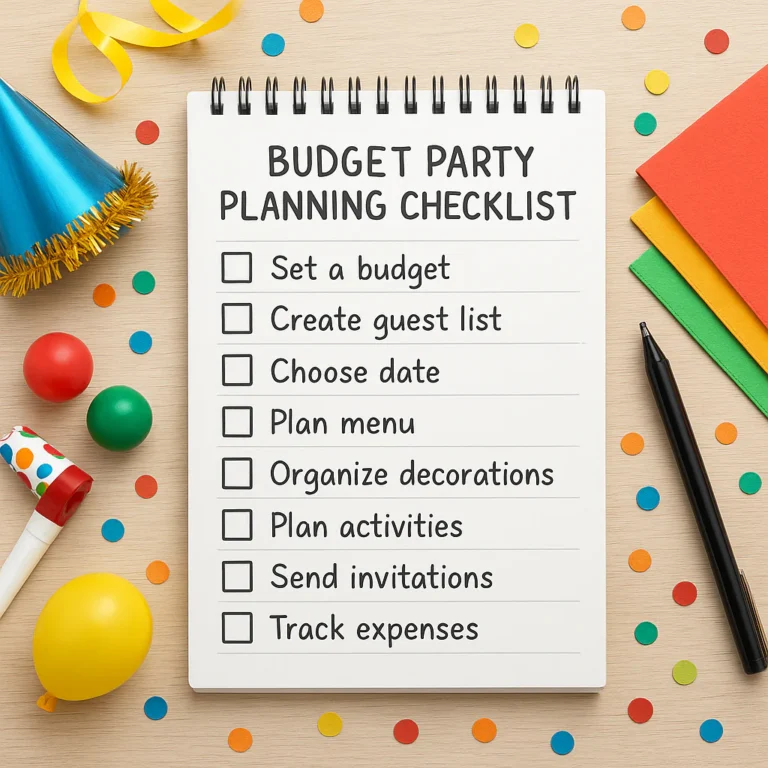
Ready to start? Check out our Budget Party Planning guide for more tips on throwing an amazing bash without breaking the bank.
🔗 Recommended Links
- Partiful: Partiful Official Website
- Evite: Evite Official Website
- Canva: Canva Official Website
- Punchbowl: Punchbowl Official Website
- Facebook Events: Facebook Official Website
- Doodle: Doodle Official Website
- SignUpGenius: SignUpGenius Official Website
- Trello: Trello Official Website
- Notion: Notion Official Website
- Eventbrite: Eventbrite Official Website
- Greenvelope: Greenvelope Official Website
- Paperless Post: Paperless Post Official Website
- Zola: Zola Official Website
- WhatsApp: WhatsApp Official Website
- Google Workspace: Google Workspace Official Website
Books on Amazon:
❓ FAQ: Frequently Asked Questions About Free Online Birthday Party Planners

What are the best free online birthday party planners?
The best free online birthday party planners depend on your needs. Partiful is excellent for trendy, social events with great RSVP tracking. Evite is perfect for traditional themes and family gatherings. Canva is ideal for those who want full creative control over their invites. Facebook Events is the best option for quick, no-fuss planning within your existing social network.
Read more about “💰 Top 10 Event Planners Who Make the Most Money (2026)”
How do I create a free birthday party checklist online?
You can create a free birthday party checklist online using tools like Google Sheets, Trello, or Notion. These platforms allow you to create customizable lists, set reminders, and track your progress. For a pre-made checklist, you can download free templates from Template.net or use the built-in checklist features in Partiful and Evite.
Read more about “🎉 15 Best Party Planning Websites to Master Your Event (2026)”
Are there free tools to manage guest lists for birthday parties?
Yes, many free tools offer guest list management. Partiful, Evite, and Facebook Events all provide built-in RSVP tracking and guest list management. SignUpGenius is great for managing potluck contributions, while Doodle helps you find the best date for your guests.
Read more about “🎉 Master Your Party Budget: 7 Steps to Track Expenses & Stay on Track (2026)”
Can I download a free printable birthday party planning checklist?
Yes, you can download free printable birthday party planning checklists from websites like Template.net and Super Busy Mum. These printables often include sections for budgeting, guest lists, and task tracking. However, for real-time updates and collaboration, digital tools are often more efficient.
Read more about “🎉 8 Best Party Planner Organizers for 2026: Stop the Chaos!”
How do I handle dietary restrictions with a free online planner?
Most modern free online planners, such as Partiful and Evite, have built-in fields for guests to specify dietary restrictions. When creating your invite, make sure to include a question about allergies or dietary needs. You can also use Google Forms to collect this information if your chosen platform doesn’t support it.
What is the best way to send digital birthday invitations?
The best way to send digital birthday invitations depends on your audience. For a fun, modern experience, use Partiful. For a classic approach, Evite is a solid choice. If you want to involve your friends in the planning process, Facebook Events or WhatsApp Groups are great options. Always ensure your invite is mobile-friendly and includes clear RSVP instructions.
Read more about “🎉 How Far in Advance Should a Party Be Planned? (2026 Guide)”
📚 Reference Links
- Partiful: Partiful – Free Online Invitations with RSVP Tracking
- Evite: Evite Official Website
- Canva: Canva Official Website
- Punchbowl: Punchbowl Official Website
- Facebook: Facebook Events
- Doodle: Doodle Official Website
- SignUpGenius: SignUpGenius Official Website
- Trello: Trello Official Website
- Notion: Notion Official Website
- Eventbrite: Eventbrite Official Website
- Greenvelope: Greenvelope Official Website
- Paperless Post: Paperless Post Official Website
- Zola: Zola Official Website
- WhatsApp: WhatsApp Official Website
- Google: Google Workspace
- Template.net: Birthday Party Planner Template
- Super Busy Mum: Let’s Plan a Party Free Party Planner Printables